Free EnergyPro Contact Helper
T24 Designer Database is a free Windows utility for EnergyPro users who need a simple way to remember designer contact information used when preparing Title 24 documents.
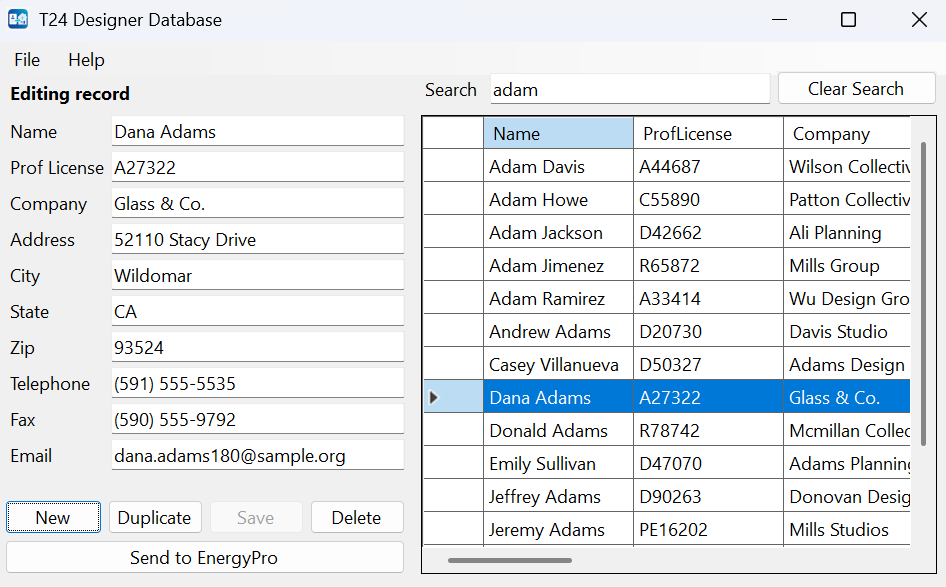
The tool stores designer contact records so you do not have to retype the same information every time you work on a Title 24 project in EnergyPro. When you select a saved record, you can transfer that contact information from the application into EnergyPro.
- Save designer contact information for reuse on future Title 24 projects.
- Easily search for saved records when you need them.
- Transfer selected contact information into EnergyPro's Designer, Lighting, or Mechanical tab.
Screenshot
Below is a screenshot of the T24 Designer Database tool:
Download T24 Designer Database
Download the free Windows utility for saving designer contact records and transferring them into EnergyPro.
Download NowFree Windows download. Depending on your browser or Windows security settings, you may be asked to confirm that you want to keep or run the file.